CAPABILITIES · v1.9.6
From opening a book
to keeping your notes.
These capabilities reflect the current source, with implementation links for each area.
EPUB, TXT and PDF text import
Drop or select reflowable EPUB, TXT or text-based PDF. TXT detection covers UTF-8, UTF-16, GB18030 / GBK and Big5, with filename metadata and automatic chapter splitting. PDF text is reconstructed from page coordinates. Long conversions expose progress and cancellation.
Implementation ↗3D bookshelf and compact list
Keep embedded covers or use generated title covers. Search by title or author and sort by last opened, import time, title or progress. Inspect chapter contents and progress from the shelf, resume reading or remove a book.
Implementation ↗Two-page reading with selectable text
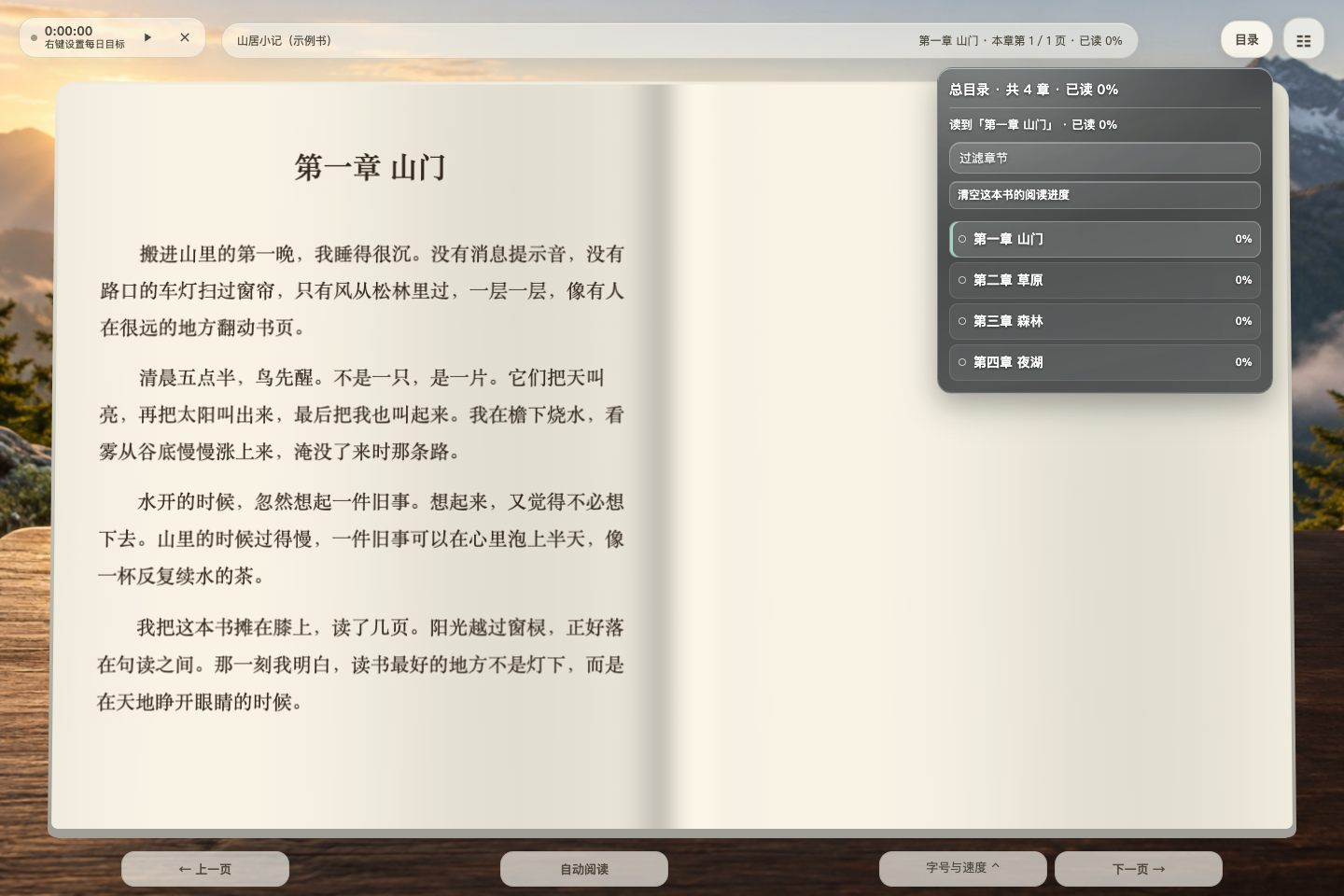
A light two-page book combines a soft gutter, parameterized paper lighting and page-turn transitions. The text remains selectable, searchable and highlightable. Choose pagination or continuous scroll; tune font family, size, line spacing, page width and density.
Implementation ↗Contents, page navigation, search and progress
Filter chapters, expand page numbers, jump by chapter or page, and inspect chapter read coverage. Hover, touch and keyboard interactions are supported. Search across chapters in Chinese or English, return to the previous reading position, restore progress on reopening, or reset progress while retaining notes and bookmarks.
Implementation ↗Auto-scroll and timed page turns
Slow, medium and fast presets accompany controls for scrolling speed, page dwell and chapter-end pauses. Automatic reading starts the timer. Manual navigation restarts the wait while keeping it running; leaving the page or switching books pauses it. Fullscreen, hidden controls and shortcuts support focus.
Implementation ↗13 scenes and custom images or videos
Built-in scenes include mountain dawn, aurora, fluid colors, gardens, grassland, forest, lake, rain garden, snow field and four book settings: desk, valley, cafe and cliff. Upload, rename and remove images or muted videos. Use a fixed scene, time-of-day slots or interval rotation with crossfades.
Implementation ↗Rain, snow and readable text
Switch rain, snow or clear weather, control intensity and motion, and tune mist, breeze, refraction, depth and distant lightning. Focus, light atmosphere and full scene presets are available. Text color and protective shading adapt to the background behind the reading area and honor reduced-motion settings.
Implementation ↗Original music, ambient sounds and official music links
Six original synthesized tracks accompany local MP3 / WAV / OGG / M4A playback, sortable playlists, seeking, volume, list or single-track repeat, sequential and shuffle modes, fades and a sleep timer. Ten ambient modes cover rain, snow, waves, wind, stream, fire, insects and white / pink / brown noise. NetEase and QQ Music use official embeds or official opening links.
Implementation ↗Highlights, notes, bookmarks and Markdown export
Select text to highlight it or add a comment. Notes belong to their book and can be edited or opened at the original passage. Bookmark the current position; highlights and bookmarks have separate sections. Deletions can be undone, and each book’s notes export as Markdown.
Implementation ↗Daily goals, a 16-week heatmap and achievements
Track today’s and total reading time, streaks, recent sessions and time-based achievements. A 16-week daily grid exposes dates and minute counts on hover, keyboard focus or touch. Daily goals show remaining time or completion. Timing pauses in the background, and history can be cleared.
Implementation ↗Local storage, backup and knowledge-library integration
Browser IndexedDB and a local SQLite mirror preserve your library. Full backups include books, backgrounds, music, notes, positions and settings. Restore by merging or replacing, with a pre-restore snapshot downloaded first. Use it independently or integrate with a companion knowledge library through local APIs and book / note links.
Implementation ↗